




- sports

- action

- cricket

- arcade

- racing

- adventure

- girls

- boys

- hot

- more

Online Games Blog
Gaming news, tips and guides from the world of online games.
HTML5 vs Native Game Development: What’s the Difference
Polished games can be built with the help of both HTML5 and native game development. However, their development routes might vary from each other. A web browser is used to run HTML5-friendly games, while native games are prepared for a specific platform and operating system. The later relies heavily on software and hardware. The choice is not simply about which technology is newer or more powerful. It usually comes down to the type of game, target audience, performance needs and how the game will be distributed. HTML5 Games Run Through the Browser: HTML5 game development uses standard web technologies such as HTML, CSS and JavaScript. Graphics can be handled through Canvas or WebGL, while browser APIs can provide audio, controllers, networking and other features. The biggest difference is what happens when the game is ready to play. A player can normally open a compatible browser, load the game and start playing without installing a traditional application. That makes HTML5 a practical choice for: Casual games Puzzle games Arcade titles Card and board games Simple sports games Social and multiplayer games Native Games Are Built for Specific Platforms: Native development takes a more platform-focused approach. A game designed for Android can use Android's development tools and APIs, while an Apple game can take advantage of technologies built for iPhone, iPad and Mac. Android's official development tools support engines such as Unity, Unreal, Defold and Godot, along with native C and C++ development. Apple also provides its own development environment and graphics technology, including Metal for hardware-accelerated 2D and 3D graphics. This platform-specific approach gives developers more control over how a game uses the device. Performance Is a Major Difference: Performance is often the first thing that comes to mind when comparing HTML5 with native development. Native games can make deeper use of the hardware available on a device. Android's NDK, for example, allows developers to use native C and C++ code and can provide more direct access to device hardware. Native development can therefore be a strong choice for games that require: Complex 3D graphics High frame rates Detailed physics Large game worlds Advanced visual effects Tight control over memory and hardware HTML5 has improved considerably. Modern browsers can run demanding 2D and 3D games using technologies such as WebGL and JavaScript, so the gap is not as simple as “browser games are slow, native games are fast.” Still, demanding games may benefit from the deeper hardware access available through native development. HTML5 Has a Clear Distribution Advantage: This is where HTML5 has a major advantage. A browser game can be published on the web instead of requiring a separate app-store download. A player can open a link and access the game from a supported browser. For developers, this can make distribution much simpler. The web is also naturally cross-platform, allowing the same game to reach computers and mobile devices with suitable browser support. Native games have a different route. They are commonly packaged and distributed through platforms such as Google Play or the App Store. That can provide useful features and a structured marketplace, but it also means following platform requirements. Native Development Gives More Device-Level Control: A native game can be designed around the features of a particular device. This can include graphics hardware, sensors, audio systems, memory management and platform-specific services. Apple's Metal, for example, gives developers direct access to the GPU and tools for analysing graphics performance. Android provides similar tools for measuring CPU, memory, GPU, network and energy performance. That level of control becomes useful when every bit of performance matters. HTML5 Is Often Easier to Access: There is a practical side to browser gaming that should not be overlooked. A casual player may not want to download a large game simply to play for ten minutes. A browser game removes much of that friction. This makes HTML5 particularly suitable for games designed around quick sessions. A player can also move between devices more easily, provided the game and browser support the required features. Native Games Can Offer Deeper Features: Native development becomes more attractive when a game needs extensive access to platform features. For example, developers may want detailed control over: Graphics rendering Device storage Notifications Audio Sensors Performance Platform-specific services Background processes Native development does not automatically make a game better, but it gives the development team more control over the environment in which the game runs. HTML5 vs Native: Quick Comparison: Feature HTML5 Native Main environment Web browser Specific platform Installation Usually not required Usually required Hardware access More limited Deeper access Cross-platform reach Strong Requires platform-specific work Updates Can be deployed directly Often handled through platform distribution High-end graphics Possible Usually better suited Distribution Web App stores/platforms Large 3D games Possible, but demanding Strong fit Casual games Excellent fit Also possible Development focus Web technologies Platform/engine-specific tools Which One Should Developers Choose? The answer depends heavily on the project. HTML5 may make more sense when: Fast access is important The game is casual A broad web audience is the target Downloads should be avoided Cross-platform access matters The game does not need maximum hardware performance Native development may be better when: Advanced 3D graphics are required Performance is a major priority Device hardware needs to be used extensively The game is designed around a particular platform Complex native features are part of the experience There is also a middle ground. Game engines can support multiple platforms and reduce the need to build every part separately. Android's current development guidance, for instance, supports engines such as Unity, Unreal, Defold and Godot alongside Android's own tools. Frequently Asked Questions (FAQs): Q1. Can HTML5 games work on mobile phones? A1. Yes. HTML5 games can be designed for mobile browsers and can support touch controls and other browser-based input methods. Q2. Are HTML5 games less powerful than native games? A2. Not necessarily. Modern browsers can run capable 2D and 3D games, but native development generally provides greater control over device hardware and can be better suited to very demanding titles. Q3. Is HTML5 better for casual games? A3. It can be. Browser access, quick loading and easy distribution make HTML5 a natural fit for many casual and short-session games. Q4. Why are native games often larger? A4. Native games may include extensive graphics, audio, game assets and platform-specific components that are installed on the device. The final size depends heavily on the individual game. The Real Difference Comes Down to Control and Access: HTML5 puts the browser at the centre of the gaming experience. Its biggest strengths are accessibility, distribution and cross-platform reach. Native development takes a different route. It gives developers a closer relationship with the target device and more control over performance and platform-specific features. Neither approach wins every situation. A quick puzzle game that needs to reach players through a link may benefit from HTML5. A graphics-heavy game that pushes a phone or console to its limits may be better suited to native development. The right technology is the one that matches the game, rather than the one that simply looks more powerful on paper.
Read more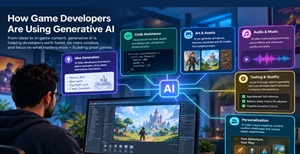
How Game Developers Are Using Generative AI
Generative AI is becoming another tool in the game developer’s toolbox. It is not replacing the whole development process, but it is helping teams handle tasks that can take hours or even days. Developers are using it for ideas, code, dialogue, artwork, testing and other parts of production. The change is also happening inside familiar game-development software. Current Unity AI tools, for example, can work inside the editor and help with project-aware development and asset creation. AI Is Speeding Up Early Game Ideas: The first stage of a game can involve a lot of brainstorming. Developers may need ideas for characters, missions, locations, enemies or gameplay mechanics before production even begins. Generative AI can help turn a rough idea into a starting point. For example, a developer working on a fantasy game could ask for: Character concepts Quest ideas Enemy variations Level themes Dialogue prompts Gameplay mechanics The important part is that these suggestions still need human judgement. A generated idea may be useful, but it does not automatically fit the game's story or mechanics. Game Art Is Another Major Use: Creating game assets can take considerable time. Generative AI can help developers produce early concepts for characters, environments, textures and other visual elements. Unity has previously highlighted AI tools that can generate 2D assets, textures and even 3D-related content. This can be particularly useful during prototyping. Instead of waiting for every finished asset, a team can create temporary visuals, test the level and replace them later. That makes the process more flexible. NPCs Can Become More Interactive: Traditional NPCs usually follow dialogue trees or predefined behaviours. Generative AI opens another possibility: characters that can respond more naturally to player actions. AI-powered NPC systems are already available for game-development platforms. Unity's ecosystem, for example, includes tools designed to give characters conversational abilities and more flexible interactions. This could make an NPC feel less like a character with five fixed replies and more like someone reacting to what is happening in the game. There is still a catch. Developers need to control what an AI character can say and do, especially in multiplayer games and games aimed at younger audiences. Writing and Dialogue Can Be Faster: Dialogue is another area where generative AI can save time. A developer can use an AI model to create a rough conversation, rewrite a line in a different tone or produce several versions of the same response. Tools integrated with Unity are already being used for AI-assisted dialogue generation and localization workflows. That does not mean writers become unnecessary. In practice, the generated material often needs editing to match the game's characters, humour, story and overall tone. AI Can Help with Coding: Programming is another practical use. Developers can ask AI tools to explain an error, suggest a code structure or create a starting point for a small feature. This can be useful for repetitive tasks and prototypes. For an experienced developer, the value may be less about getting an entire system written and more about reducing the time spent on small jobs. A developer still needs to test the code. AI-generated code can contain mistakes, inefficient approaches or security problems. Testing Can Also Benefit: Game testing involves finding crashes, broken mechanics, unusual player behaviour and other problems. AI-assisted testing can help automate parts of this work. Unity has highlighted automated QA tools that allow AI bots to explore levels and report issues such as errors and crashes. This does not remove the need for human testers. Players do things that automated systems may not anticipate, and subjective issues such as whether a level feels boring are difficult to measure. Personalised Games Could Be the Next Step: One of the more interesting possibilities is games that react to individual players. Generative AI could help adjust: Dialogue Missions Enemy behaviour Difficulty Character interactions World events The idea is not simply to generate more content. It is to make the content feel more relevant to the player. Unity has discussed the possibility of AI-driven systems that respond to player behaviour and dynamically adjust gameplay. Where Developers Still Need to Be Careful? Generative AI is useful, but it brings practical concerns. Developers still need to check: Whether generated content fits the game's style Copyright and licensing issues Accuracy of generated code Privacy and data handling Quality of AI-generated dialogue Performance and server costs Safety of AI-powered interactions The industry's attitude is also not simply “use AI everywhere.” A 2025 GDC report found that more than 30% of game developers surveyed were using generative AI tools at work, while also noting concerns about using the technology as an assistance tool rather than replacing creative roles. Generative AI Is More of an Assistant Than a Replacement: The most practical way to look at generative AI in game development is as a production assistant. It can handle first drafts, repetitive work and quick experiments. Developers and artists can then spend more time on decisions that shape the actual game. That distinction matters. A game is not just a collection of assets and lines of code. Game feel, pacing, balance, art direction and storytelling still require people who understand what makes the experience enjoyable. The Bigger Change Is in the Workflow: Generative AI is changing game development less by creating a finished game with one command and more by shortening the distance between an idea and a working prototype. A designer can test more ideas. A programmer can work through repetitive tasks faster. Artists can explore more concepts, while writers can experiment with dialogue and story branches. The technology still has limits, and human review remains important. But as AI becomes more closely connected with game engines and development tools, its role is likely to become a normal part of the workflow rather than a separate experiment. Frequently Asked Questions (FAQs) How is generative AI used in game development? It can assist with game ideas, dialogue, coding, artwork, NPC behaviour, asset creation and automated testing. Can AI create an entire game? AI can help generate many individual parts, but a complete, polished game still requires planning, development, testing, editing and human decision-making. Can AI create game characters? Yes. AI tools can assist with character concepts, dialogue, voices, visuals and behaviour. Some current tools also support conversational NPCs. Will generative AI replace game developers? It is more realistic to view AI as a tool that changes how developers work. Current industry reporting shows adoption alongside concerns about relying on it as a replacement for creative roles.
Read more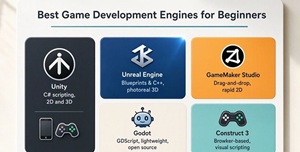
Best Game Engines for Beginners: Top 5 Compared
Choosing the best game development engine for beginners depends on the type of game you want to make, design, your programming experience and the computer you use. Some engines make it easier to create 2D games with visual tools, while others provide more advanced systems for building 3D worlds. Godot, Unity, Unreal Engine, GameMaker and Construct are all worth considering, but they suit different needs. This guide compares their strengths, learning curves and ideal use cases to help you choose an engine for your first game. What Makes a Game Engine Beginner-Friendly? A good first engine should not make simple tasks unnecessarily difficult. Clear menus, useful tutorials and quick testing can make the learning process less frustrating. Several points are worth checking before installing an engine: Ease of learning and navigation Support for 2D or 3D development Programming requirements Quality of tutorials and documentation Hardware requirements Export options for different platforms Community support and learning resources Pricing and licensing terms A beginner does not need the most powerful engine available. A tool that makes the first small game possible is often the better starting point. Godot: A Simple Starting Point for 2D: Godot is a strong starting point for beginners who want an integrated development environment without a licensing cost. Its scene-and-node system helps organize game objects and reusable components, while GDScript provides an approachable route into programming. Godot also supports 3D development, so beginners can move beyond 2D projects as their skills grow. It is particularly worth considering for 2D platformers, puzzle games, arcade games and small indie projects. Godot works well for: 2D platformers Puzzle games Arcade games Small indie projects Beginners learning game programming The biggest attraction is its straightforward approach. There is less pressure to understand a huge collection of advanced features before getting a basic game running. Unity: A Broad Choice for New Developers: Unity is worth considering if you want to explore both 2D and 3D development, build mobile games or learn C# while creating playable projects. Its broad set of tools can support increasingly ambitious games, although its editor and workflows take time to learn. Before committing to Unity, check the current Personal plan eligibility requirements and licensing terms, especially if you intend to release a commercial game. It is a sensible choice for beginners interested in: Mobile games 2D and 3D development Indie games C# programming Building skills for larger projects Unreal Engine: A Serious Option for 3D: Unreal Engine is known for detailed graphics and large-scale 3D development. It is more demanding than some beginner-focused tools, but that does not make it unsuitable for newcomers. Its Blueprint visual scripting system gives beginners a way to create gameplay logic without immediately writing large amounts of C++ code. Unreal makes the most sense when the goal is to learn 3D development, create realistic environments or eventually work with more advanced graphics. The trade-off is simple: there is more to learn. GameMaker: Strong for 2D Projects: GameMaker takes a more focused approach. It is particularly useful for 2D games and has tools designed to get gameplay working without requiring beginners to build every underlying system. This makes it a practical choice for platformers, top-down games and arcade projects. For someone whose first idea is a small 2D game rather than a realistic 3D world, GameMaker can be easier to handle than a much larger engine. Construct: Useful for Visual Game Creation: Construct is positioned well for visual game creation. Clarify that visual development does not mean the tool is incapable of making complex interactions; rather, it lets users work with event-based logic instead of making traditional programming the first hurdle. You should also distinguish between browser-based game creation and publishing a game to a browser. They are related but not identical. Readers should check the current plan's export and publishing limits before choosing a tool for a specific project. Quick Comparison: Engine Best For Learning Curve Main Advantage Unity 2D, 3D and mobile Moderate Wide range of tools Godot 2D and indie games Low to moderate Simple workflow Unreal Engine 3D games Moderate to high Advanced 3D features Construct 2D and browser games Low Visual development GameMaker 2D games Low to moderate Fast game creation How to Choose Your First Game Engine Before installing an engine, consider these four factors: 1. The type of game: For a 2D platformer or puzzle game, Godot or GameMaker may be a practical starting point. For a visually rich 3D game, Unreal Engine may be more suitable. 2. Your programming experience: Construct's visual workflow can help beginners start with game logic. Godot introduces programming through GDScript, while Unity uses C#. Unreal Engine offers Blueprint visual scripting alongside C++. 3. Your computer's capabilities: Check the engine's system requirements before downloading it. Larger 3D development environments may need more capable hardware than a simple 2D project. 4. Your budget and publishing plans: Compare the current license terms, export options and commercial-use requirements. A tool that is free to learn may have different conditions for selling a finished game. The First Game Should Be Small: The engine is only part of the learning process. Project size matters just as much. A first game can focus on a few basic features: Player movement One playable level Simple enemies or obstacles A scoring system Basic sound Start and restart options Finishing a small game teaches more than spending months building an oversized project that never becomes playable. Should the first game be made in 2D or 3D? A small 2D game is often easier for learning basic concepts such as movement, collisions, scoring and game logic. Once those ideas become familiar, moving into 3D is less intimidating. Pick the Tool Around the Project: Choosing a game engine should not become a competition over which software has the longest feature list. The practical question is what the first game actually needs. For 2D projects, Godot and GameMaker can keep the process manageable. Unity offers a broader path into 2D, 3D and mobile development, while Unreal is a natural choice for beginners drawn toward advanced 3D. Construct stands out for visual, browser-friendly game creation. The best beginner engine is ultimately the one that makes it easier to build, test and finish a first game. That first finished project is where most of the real learning begins. Frequently Asked Questions (FAQs) Which game engine is easiest for beginners? Godot, GameMaker and Construct are generally approachable options, especially for beginners starting with 2D games. Is Unity suitable for someone with no coding experience? Yes. Unity can be used by beginners, although learning basic C# gradually will make it much easier to build more advanced gameplay. Is Unreal Engine too difficult for beginners? Not necessarily. Beginners interested in 3D can start with Unreal, and Blueprint visual scripting provides an alternative to writing C++ immediately.
Read more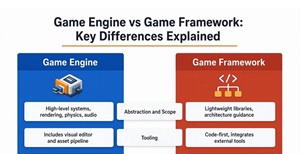
Game Engine vs Game Framework: Key Differences Explained
Game engines and game frameworks both help developers build games, but they offer different levels of built-in functionality. A game engine typically combines tools for graphics, physics, animation, audio, scripting and testing in one development environment. A game framework provides a collection of libraries and APIs that developers use to build these systems into a working game. The main difference between a game engine and a game framework is how much of the development environment and supporting systems are already integrated. Understanding that distinction can help you choose the right tool for your project's scope, your programming experience and your target platform. What Is a Game Engine? A game engine is a larger development package. It normally combines tools for graphics, physics, audio, animation, input, scenes, scripting and debugging in one environment. Unity, Unreal Engine and Godot are common examples. Godot, for instance, describes itself as a complete 2D and 3D engine with tools for creating and exporting games to desktop, mobile and web platforms. A developer can therefore spend more time working on the actual game instead of creating basic systems from scratch. What Is a Game Framework? A game framework sits closer to the programming side of development. It provides code libraries and structures for common game tasks, but it generally leaves more decisions in the hands of the developer. There may not be a large editor with every tool already arranged in one place. A framework might provide support for: Rendering Input handling Audio Game loops Basic physics Asset management Window and screen management The developer then builds the rest of the architecture around those parts. This approach can take longer, but it also gives experienced programmers more control over how the game is organised. Game Engine vs Game Framework: Key Differences: The simplest comparison is this: Engine = more ready-made systems. Framework = more freedom to build the systems around the available tools. That does not mean an engine removes programming. Developers still write gameplay code, design systems and make countless technical decisions. For example, Unreal Engine also has a system called the Gameplay Framework, which includes classes and systems for managing gameplay, players, pawns, controllers and game modes. This is part of Unreal Engine itself, rather than an example of a standalone game framework. It shows that a full engine can provide structured systems while still allowing developers to customize their games. A frameworks generally provide a more focused set of APIs and leave more integration or architecture decisions to the developer. Engine vs Framework at a Glance: Feature Game Engine Game Framework Core offering Integrated game development environment and systems Libraries and APIs for selected game-development tasks Rendering Usually integrated Provided by the framework or supporting libraries Visual editor Often included May be limited, optional, or external Animation tools Usually included Varies; may require additional libraries or custom systems. Physics Often provides established workflows Depends on the framework Project structure More organised Usually leaves more architecture decisions to the developer Coding freedom Moderate to high High, with engine-defined workflows and APIs Getting started Often quicker for complete game projects Can require more setup and programming Best fit Projects that benefit from an integrated toolset Projects needing a focused foundation or custom architecture These are general tendencies, not strict rules. Individual engines and frameworks differ in the features they provide. Examples of Game Engines and Game Frameworks Game engines and frameworks serve different development needs. The best option depends on the type of game you want to create, the programming language you prefer and how much of the underlying technology you want to manage. Game engines Godot: An open-source engine for 2D and 3D games, with an editor, scene system and integrated development tools. Unity: A game engine used for a wide range of 2D and 3D projects, with an editor and an extensible development ecosystem. Unreal Engine: A full game engine with extensive rendering, gameplay and production tools. Game frameworks Phaser: A JavaScript and TypeScript framework focused on 2D HTML5 games for desktop and mobile browsers. MonoGame: A C# framework that provides core game-development APIs for graphics, input, audio and content management. LÖVE (Love2D): A framework for developing 2D games using Lua. A framework is not necessarily limited to basic features. Phaser, for example, provides rendering and other game-development capabilities while leaving developers responsible for more of the surrounding project structure. Similarly, an engine does not prevent developers from writing custom systems. For browser-based 2D games, Phaser is worth considering. For projects that need a broader integrated editor and development environment, Godot, Unity or Unreal Engine may be a better fit. Why Developers Choose Game Engines? Engines make sense when speed and a complete toolset matter. A small team can create a playable prototype without first developing its own editor, rendering pipeline or asset management system. Built-in debugging and visual tools can also make it easier to find problems. Another advantage is platform support. Modern engines can help prepare games for several platforms without rebuilding every major system separately. Godot, for example, supports exporting projects to desktop, mobile and web platforms. Engines can also provide large ecosystems. Assets, plugins, tutorials and community support can reduce the amount of work needed for common problems. Why Some Developers Prefer Frameworks? Frameworks appeal to developers who do not want a large engine deciding how the project should be structured. A custom game may need an unusual rendering system, a lightweight architecture or a very specific performance setup. Building around a framework can make those choices easier. There is also a learning benefit. Working closer to the underlying code can give developers a clearer idea of how game loops, rendering, input and other systems actually work. The trade-off is obvious: more control usually means more work. Which One Is Better for Beginners? For someone starting game development, a full engine is usually the easier entry point. A visual editor can show scenes, objects, animations and game elements without requiring every system to be created through code. Godot's scene system, for example, uses reusable scenes and nodes to organise game content. Framework-based development can be a better fit once programming fundamentals are already comfortable. It gives developers room to experiment with architecture instead of following a more structured engine workflow. When a Framework Makes More Sense? A framework may be worth considering when the project has specific technical requirements. It can be a good option when: The game needs a custom architecture. The development team has strong programming skills. A lightweight project is preferred. Built-in engine features are not required. The team wants control over individual systems. Performance needs to be tuned around a specialised design. For a simple 2D game, a framework can be enough. For a large 3D project with animation, physics, lighting, networking and editor tools, building everything around a framework can quickly become a much bigger job. The Choice Depends on the Game, Not the Label: Game engines and frameworks are not really competitors in every situation. They solve different problems. An engine is useful when a development team wants a broad set of tools ready to work together. A framework is useful when the team wants a smaller foundation and greater control over what gets built around it. For beginners and many indie teams, an engine can reduce unnecessary technical work. For experienced developers with a specific architecture in mind, a framework can provide the freedom to build things differently. The better question is not “Which technology is more powerful?” It is “How much of the game’s technology should the development team build itself?” That answer usually makes the choice much easier. Frequently Asked Questions (FAQs) Is a game framework easier than an engine? Usually not. A framework can require more programming because developers need to build or connect systems that a full engine may already provide. Is Unity a game engine or a framework? Unity is a game engine. It provides an editor and integrated systems for areas such as graphics, physics, animation, audio and game development workflows. Which is better for a beginner: an engine or framework? A game engine is generally the more practical starting point because it provides more ready-to-use tools. Framework development becomes more attractive as programming experience grows. Can a game be made without a game engine? Yes. A game can be developed using frameworks, libraries and custom code. The amount of work depends on how many systems need to be built independently.
Read more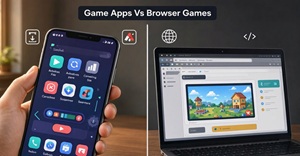
Game Apps Vs Browser Games in 2026: Which Is Better for Casual Gaming
Casual gaming in 2026 is less about owning a game and more about getting into a game quickly. A few free minutes can be enough for a puzzle, cricket match, racing round or arcade challenge. That is where the difference between mobile apps and browser games becomes noticeable. Mobile game apps still offer strong performance, offline features and deeper device integration. Browser games take a different route: open a webpage, let the game load and start playing. Modern web technology is capable of much more than the simple games associated with the old Flash era. Current browsers support graphics, audio, touch input, networking and other features needed for proper gaming. Browser Games Have the Convenience Factor: For casual players, convenience can matter more than having the most advanced graphics. A browser game does not normally require an app-store installation. That makes it easier to test a new title without committing storage space to it. This is useful for games such as: Puzzle and board games Simple sports games Endless runners Card games Arcade challenges Short multiplayer games There is also less clutter on the phone. Once the gaming session is over, the browser tab can simply be closed. Mobile Apps Still Have Important Advantages: Mobile apps are not going away. They remain the better fit for games that need serious hardware performance or large amounts of locally stored content. An installed game can make extensive use of the device's graphics processor, storage, vibration, sensors and other platform features. Offline play can also be more reliable because much of the required content is already on the device. For a player who spends several hours with the same game, those advantages can outweigh the convenience of browser access. 2026 Is Putting More Attention on Low-Friction Gaming: There is a practical reason browser gaming continues to attract attention. A recent 2026 web-gaming study from Poki found that players are increasingly sensitive to friction such as long loading times and large downloads. In its survey, 46% of web gamers said they had stopped playing a mobile game because it took too long to open or load, while 28% stopped because the download was too large. That does not mean every player prefers browser games. It does show why quick access matters. Casual gaming is built around short decisions: play now or do something else. Every extra step can affect that choice. Browser Gaming Is Not Just Basic 2D Gaming: The old idea that browser games are limited to simple animations no longer holds up. HTML5 games can use technologies including WebGL for graphics, Web Audio for sound, WebSockets or WebRTC for networking, and browser APIs for touch and controller input. This opens the door to more varied experiences. Browser games can now cover 2D action, multiplayer titles, sports games and some demanding 3D experiences. That does not put every browser game on the same level as a large native release. It simply means the gap is not as wide as it once was. Apps Make More Sense for Long-Term Gaming: Mobile apps usually win when a game is designed to become a regular part of a player's routine. An installed game can support: Large downloadable content Detailed graphics Offline modes Persistent notifications Deeper device integration More complex progression systems There is also a psychological difference. Once a game is installed, it is always sitting on the home screen, ready for another session. That can be useful for players who return to the same game every day. Browser Games Work Well for Short Sessions: Browser gaming has a natural advantage when the session itself is short. A five-minute game does not necessarily need a huge installation, a complicated account setup or a long tutorial. The format works especially well when the objective is straightforward: complete a level, beat a score, solve a puzzle or finish a quick match. This is one reason web games continue to fit the casual market. MDN describes HTML games as particularly suitable for experiences that can be played across mobile devices and other platforms, including quick “time killer” style games. A Quick Comparison for Casual Players: Feature Browser Games Mobile Apps Storage Generally lighter Can require significant space Installation Usually not needed Required Offline play Depends on the game Usually stronger Quick sessions Excellent fit Good Device features More limited Deeper access Graphics Good to very good Better for demanding titles Cross-device use Strong More platform-specific Updates Often delivered through the website Usually app-based Best for Casual, quick sessions Regular and longer gaming Updates Are Another Difference: Web games have a useful advantage when developers need to push changes quickly. The game files can be updated on the server, so players can receive a new version when the page loads. Native apps have a different process. Updates are normally distributed through an app store, although games can also download additional content after installation. For developers, the web can therefore be a flexible distribution channel. MDN highlights direct distribution and the ability to update web games without relying on traditional app-store approval as important advantages. Which Option Uses Less Commitment? This is where browser games have a particularly strong case. Installing an app is a small commitment, but casual gaming often does not need one. A browser title can be tested, played and forgotten without taking up a permanent place in the app library. That is useful when players regularly switch between different games instead of following one title for months. Mobile apps, on the other hand, are better suited to games that benefit from long-term progression and regular play. Frequently Asked Questions (FAQs): Q1. Do browser games work on smartphones in 2026? A1. Yes. Modern web technologies support mobile browsers, touch controls, graphics, sound and networking. Actual performance depends on the game, browser and device. Q2. Are browser games better than mobile apps for casual gaming? A2. For quick sessions, browser games can be more convenient because they usually do not require installation. Mobile apps are often better when performance, offline play or deeper device features matter. Q3. Which is better for offline casual gaming? A3. A mobile app usually has the advantage because game content can be stored locally. Browser games can support offline functionality, but it depends on how the individual game was developed. Q4. Are browser games faster than mobile apps? A4. Not automatically. A lightweight browser game may start very quickly, but a large or poorly optimised web game can still take time to load. The Better Choice Depends on the Gaming Habit: There is no universal winner in the browser-versus-app debate. For a player who wants quick access, minimal storage use and a game that can be opened whenever there is spare time, browser gaming is a sensible choice. For someone who wants high-end graphics, offline access and a game that becomes part of a daily routine, a mobile app is usually more suitable. In 2026, the difference is less about what the technology can do and more about what the player actually needs. Browser games have become capable enough to handle serious casual gaming, while mobile apps continue to lead when deeper performance and device integration are the priority. For casual gaming, less friction can be just as valuable as more features.
Read more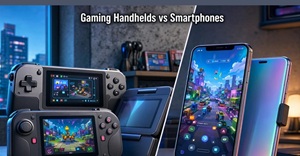
Gaming Handhelds vs Smartphones: Which Is Better for Casual Gaming?
Casual gaming has changed quite a bit. You no longer need to sit in front of a TV or PC every time you want to play something. A smartphone is already in most people's pockets, while dedicated gaming handhelds have become more capable and easier to carry. That raises a practical question for casual players: is your Android phone already good enough for mobile and browser gaming, or does a dedicated gaming handheld offer enough of an improvement to justify carrying another device? There isn't one answer for everyone. Someone who plays a browser puzzle game for ten minutes during a break may find a phone hard to beat. Someone who spends an hour playing an RPG, racing game or controller-based title may prefer the physical controls and comfort of a handheld. For Quick Games, Your Phone Has the Advantage: The biggest strength of a smartphone is that you already have one. There is nothing extra to charge, remember or carry. If you have five minutes while waiting for an appointment, you can open a game and start playing. Phones are particularly convenient for: Puzzle games Card games Casual strategy Word games Simple arcade titles Short multiplayer sessions The touchscreen also works well for games designed around tapping and swiping. For these games, physical controls aren't necessarily an improvement. And there is another benefit: your phone can do far more than play games. Buying a separate device purely for occasional gaming may not make financial sense. Where a Handheld Starts to Make More Sense? The situation changes when a "quick game" turns into a 45-minute session. Touch controls can become frustrating when a game needs two analogue sticks, triggers and several buttons. Your fingers can cover parts of the screen, and the experience doesn't always feel natural. A dedicated gaming handheld solves that immediately. You get proper: Analogue sticks Face buttons Shoulder buttons Triggers D-pad Ergonomic grips It feels closer to using a traditional console controller because that is essentially what the handheld is built around. Modern Phones Can Also Become Handhelds: This is where the comparison gets interesting. You don't necessarily have to choose between a phone and dedicated gaming hardware. A controller can turn a compatible iPhone or Android device into something that looks and feels much closer to a portable console. Current mobile controllers range from compact clip-on designs to full-size grip-style models. WIRED's 2026 testing found that controllers such as the Backbone One can provide a comfortable experience for extended sessions, while models such as the GameSir G8 Galileo offer larger grips, Hall-effect controls and pass-through charging. So, if you already own a powerful phone, spending money on a controller may be a much cheaper experiment than buying a completely separate handheld. What About Browser Games? Browser games are an interesting middle ground because they don't necessarily require a dedicated gaming device. A lightweight browser game can run perfectly well on an Android phone, while a controller-compatible browser game can become much more comfortable when paired with physical controls. The main issue is compatibility. A dedicated handheld designed for PC games may provide excellent controls but doesn't automatically make every browser game available or compatible. On Android, the browser, game and controller all need to work together. The Real Difference Is the Games: This is probably the most important part of the comparison. Don't choose the device first. Choose the games first. A phone is excellent if your library mainly consists of mobile-native games. Android and iOS now have plenty of premium titles as well, including games such as Dead Cells , Stardew Valley , GRID Legends and other controller-supported releases. A dedicated PC handheld becomes more interesting if you want access to a broader PC library. For example, someone who wants to play demanding PC games, older PC titles or a large Steam library while away from a desk will probably get more from a handheld than from a standard smartphone. What games do you want to play, and what controls do those games require? Game type Smartphone Handheld Puzzle browser games Excellent Usually unnecessary Card games Excellent Usually unnecessary Touch-based arcade games Excellent Good Racing games Good with controller Excellent Action games Good with controller Excellent Strategy games Good Good PC browser games Depends on controls Better with compatible handheld Cloud gaming Good with controller Excellent Long RPG sessions Good with controller Excellent Controls Can Change the Whole Experience: Imagine playing a racing game using touchscreen buttons. It works. Now play the same game with proper triggers and analogue controls. The difference is immediately noticeable. This is particularly true for: Racing games Action games Platformers Fighting games Third-person adventures Shooters Touch controls aren't bad. They're simply better suited to games designed around them. A controller-equipped phone can close some of the gap, but a dedicated handheld still has the advantage of having the controls permanently attached and designed as part of the device. What About Portability? Here, the smartphone wins easily. A phone also lets you open a browser game without planning ahead. There's no need to decide which games to install on a separate device before leaving home. That's not necessarily a deal-breaker, but casual players should ask themselves whether they'll actually carry it. A useful way to look at it is: Situation Better choice Reason Browser games Smartphone Convenient and easy to access 5–10 minute sessions Smartphone Already in your pocket PC games PC handheld Broader PC compatibility Long RPG sessions Handheld Better physical controls Racing games Handheld/controller Physical triggers and analogue controls Travel Depends Size and battery life matter Cloud gaming Either Controller support matters more Casual puzzle games Smartphone Quick and convenient Battery Life Is Worth Thinking About: Your phone has another job besides gaming. It needs to remain available for calls, messages, maps, photos and other everyday tasks. Spending several hours gaming can therefore be inconvenient if you need the phone later. A dedicated handheld separates the two. You can drain the handheld's battery without worrying about arriving somewhere with 15% phone battery. That sounds like a small advantage, but it becomes useful during long trips. The downside is obvious: now you have two batteries to charge. Handhelds Also Have a Comfort Advantage: A smartphone is thin and lightweight, but that doesn't automatically make it comfortable for gaming. Holding a phone by its edges for a long time can feel awkward, particularly when you're playing a game that needs constant inputs. A dedicated handheld is shaped around your hands. That extra bulk is actually useful. The same is true if you add a large controller to a phone. You gain comfort, but you've also made the setup considerably bigger. Current 2026 controller testing shows that larger phone controllers can provide much more comfortable long-session gaming, but they sacrifice some portability compared with slimmer models. The Price Changes the Calculation: If you already own a good smartphone, the cheapest option is obvious: use what you have. You might spend nothing. A controller is the next step if touchscreen controls are holding you back. Dedicated handhelds come later if you want a more complete gaming experience. The mistake would be buying an expensive handheld for games that your phone already handles perfectly well. On the other hand, if you're regularly using cloud gaming, remote play or controller-based games, the cost of a handheld may be easier to justify. Which One Should Casual Gamers Choose? I'd keep it simple. Choose your smartphone if: You play in short bursts You mostly play mobile games Portability is your priority You don't want another device to charge Touch controls don't bother you Choose a handheld if: You regularly play for 30 minutes or longer You prefer physical controls You want PC or console-style games You play RPGs, racing games or action titles You want a device dedicated to gaming And there is a middle option: use your smartphone with a good controller. That can be surprisingly effective. In 2026, mobile controllers are good enough to make a phone feel much closer to a traditional portable console, and several support remote play and cloud gaming services as well.
Read more
Why Are Browser Games So Slow on Android Phones?
You tap a browser game on your Android phone expecting a quick round, but instead the screen freezes, the animation starts jumping and your phone begins feeling warmer than it should. Sometimes the game loads quickly but becomes sluggish once you actually start playing. So, is the problem the browser? Not always. A browser game has to juggle several jobs at once: downloading assets, running JavaScript, drawing graphics, responding to touch and communicating with a server. On an Android phone, all of that is happening on mobile hardware with its own processing, memory and thermal limits. Browser games can be slow on Android because of limited processing resources, overheating, demanding graphics, too many background apps or tabs, inefficient game code, large assets, or network problems. If a game loads slowly, check your connection first. If it loads quickly but stutters during gameplay, the phone, browser or game's rendering workload is more likely to be responsible. Your Android Phone May Be Doing Too Much at Once The first thing to check is whether the game is actually the problem. If you have dozens of browser tabs open, several apps running in the background and limited free memory, the browser has less room to work comfortably. Things that can make a noticeable difference include: Closing unused tabs Restarting the browser Closing demanding apps in the background Keeping the phone from overheating Updating the browser Trying the game after reconnecting to a stronger network A slow phone does not necessarily mean the phone is old. Heat can also affect performance, particularly during longer gaming sessions. A Fast Internet Connection Doesn't Guarantee Smooth Gameplay: This is an easy one to misunderstand. Your internet connection mainly affects how quickly the game and its assets arrive. Once the game is running, the phone still has to process the game's code and render every frame. A game can therefore have: Fast loading + poor gameplay performance Or Slow loading + smooth gameplay once loaded. Network latency can also become noticeable in multiplayer games . Mobile networks introduce additional delays between the device and server, and poor coverage can make the problem worse. So if a game takes ages to open, suspect the connection or the size of its files. If it opens quickly but stutters during gameplay, look more closely at processing and rendering. Graphics-Heavy Browser Games Can Slow Down Your Phone Modern browser games are capable of much more than the simple games associated with the early web. WebGL is widely used for hardware-accelerated graphics on the web, while newer technologies such as WebGPU provide developers with a more modern API for graphics and GPU computation. That is great for developers, but it also means a browser game can put considerable pressure on a phone. Lots of: 3D objects Particle effects Shadows High-resolution textures Lighting effects Animations can increase the workload. An older or budget phone may simply struggle with a game that runs comfortably on a newer device. The Browser's Main Thread Can Become a Bottleneck: There is another piece of the puzzle that players rarely see. Browsers have to handle JavaScript, page layout, rendering and user interactions. If too much work is pushed onto the main thread, the game can become unresponsive. MDN notes that a busy main thread can delay touch and other interactions, producing the kind of sluggish response users notice immediately. This is why a game may look fine for a moment and then suddenly start stuttering when lots of objects appear on screen. The developer may need to reduce unnecessary calculations, simplify rendering or move suitable work away from the main thread. Large Game Assets Can Slow Loading and Increase Memory Use: A game does not only download its programming code. It may also need: Character images Backgrounds Music Sound effects Fonts 3D models Texture files Multiplayer data Large assets take longer to download and may also consume more memory once loaded. Mobile devices can be particularly sensitive to this. MDN points out that downloading large files and rendering large images can take longer on mobile hardware, even when a connection appears fast. This is one reason good mobile browser games are usually designed with performance in mind rather than simply shrinking a desktop game onto a phone. Sometimes the Website Around the Game Is the Problem: You might think you're loading a game, but you're actually loading an entire webpage first. Advertisements, analytics scripts, social widgets, animations and other third-party content can all consume resources. That can leave less processing time for the game itself. Web performance isn't only about the game engine. The browser has to process the whole page, and excessive JavaScript can affect loading, rendering, battery usage and responsiveness. This is why two games with similar graphics can perform very differently. Why FPS Drops Happen? FPS, or frames per second, is basically how often the game updates the image shown on screen. When the phone cannot finish all the work quickly enough, frames are missed. The result is familiar: Movement looks choppy Characters appear to jump Touch responses feel delayed Animations lose their smoothness For animation, MDN uses roughly 16.7 milliseconds as a useful frame-time target for 60fps. That may sound like a tiny amount of time—and it is. A game has very little room for unnecessary work if it wants to maintain a smooth experience. How to Fix Slow Browser Games on Android If a browser game is running badly, try this quick checklist: Problem First Things to Try Gameplay stutters Close other apps and tabs Game loads slowly Switch to a stronger connection Touch feels delayed Try another browser or restart it Phone gets hot Take a break and let it cool Everything is slow Check the phone/browser itself Only one game is slow The game's optimization may be the issue Multiplayer lags Check network stability You can also try lowering graphics quality if the game provides the option. Developers Have a Job to Do, Too Players can optimize their phones, but developers have plenty of responsibility here. A well-built game should consider different devices instead of assuming everyone owns the latest flagship phone. Good optimization can involve: Compressing assets Loading content only when needed Reducing unnecessary calculations Limiting expensive visual effects Avoiding excessive network requests Optimizing JavaScript Testing on weaker mobile hardware The browser itself has many performance tools and APIs available to developers. The challenge is using them sensibly. So, Is Browser Gaming Actually Slow? Not by default. Modern browsers are capable gaming platforms. The web now supports hardware-accelerated graphics, sophisticated networking and performance-focused technologies that make much richer games possible. The real issue is the combination of game complexity + device capability + browser workload + network conditions . A lightweight puzzle might run perfectly on an inexpensive phone, while a graphics-heavy 3D game pushes that same device to its limits. So next time a browser game starts crawling, don't immediately blame the browser. It could be your connection. It could be the phone's temperature. It could be too many background processes. Or, quite simply, the game itself may need better optimization. Frequently Asked Questions: Why do browser games lag more on phones than PCs? Phones generally have different processing, graphics and thermal limits. A demanding game can therefore place more pressure on mobile hardware. Can clearing browser tabs make games faster? It can help when other tabs or apps are consuming significant memory or processing resources. Does better internet improve FPS? Usually, a faster connection improves loading and network responsiveness rather than the game's local FPS. FPS is more closely tied to rendering and processing performance. Why does my phone get hot while playing browser games? A demanding game can keep the CPU and GPU busy for an extended period. That workload produces heat, particularly during graphics-heavy gameplay.
Read more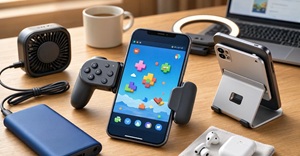
Best Mobile Gaming Accessories for Playing Browser Games
Browser gaming on a phone is slightly different from playing a native mobile game. Compatibility depends not only on the phone and accessory, but also on how the browser game handles touch, keyboard, mouse and gamepad input. That is where the right mobile gaming accessories can make a difference. You don't need to turn your phone into an expensive gaming machine. A few sensible additions can make browser gaming more comfortable, especially if you regularly play racing, action, arcade or multiplayer games. The best mobile gaming accessories for browser games are a mobile controller, phone stand, headphones and power bank. A controller is the most useful upgrade for action, racing and arcade games, while a keyboard and mouse may be better for strategy and simulation titles. The right choice depends on whether the browser game supports touch, gamepad or keyboard controls. Mobile Gaming Controller: If I had to pick just one accessory, it would be a mobile gaming controller. Touch controls are fine for simple puzzle games or short sessions. But once a browser game needs an analogue stick, shoulder trigger or several buttons at the same time, the touchscreen can become frustrating. A telescopic controller grips the phone on both sides and turns it into something much closer to a traditional handheld. Current 2026 testing from WIRED includes USB-C controllers such as the Backbone One and GameSir G8 Galileo, with features such as pass-through charging and programmable controls on some models. For browser gaming, check these things before buying: Android or iPhone compatibility USB-C or Bluetooth connection Full-size analogue sticks Comfortable grips Pass-through charging Button remapping Support for your browser and device Don't assume every controller will work perfectly with every browser game. The game itself also needs to recognise gamepad input. Why Do Physical Controls Matter for Browser Games? A controller isn't useful simply because it looks more like a console accessory. It changes how you interact with the game. Imagine playing a browser racing game. Steering with an on-screen button can work, but an analogue stick gives you more control. The same goes for platform games where timing and movement matter. Modern browsers provide the Gamepad API, which allows websites to detect compatible controllers and read inputs such as buttons and analogue sticks. However, the browser API doesn't automatically add controller support to a game. The developer still has to implement gamepad controls. There is one catch: controller support depends on the individual game. Some browser games are built for touch, some expect keyboard and mouse, and others support gamepads properly. Phone Stand for Longer Gaming Sessions: Not every game needs a controller. For slower games, strategy titles, card games or browser games that rely mainly on touch, a simple phone stand can be more useful. Instead of holding your phone for an hour, place it at a comfortable angle and play with your hands free. A stand is particularly handy if you use a separate Bluetooth controller. You can create a simple setup like this: Phone → Stand → Bluetooth controller → Headphones It is inexpensive, portable and doesn't require buying a dedicated handheld. Gaming Headphones for Browser Games: Sound is easy to ignore until you're playing somewhere noisy. A decent pair of wired or wireless headphones can make browser games feel much more immersive, particularly games with music, sound effects or voice audio. For mobile gaming, I would look for: Comfortable fit Low-latency wireless mode, if available Good microphone quality for multiplayer Reasonable battery life Easy device switching You don't necessarily need expensive gaming headphones. Comfort matters more if you're playing for long periods. Power Bank for Mobile Gaming: There is nothing particularly enjoyable about watching your phone drop from 30% to 5% while you're in the middle of a game. Browser gaming can be demanding, particularly when the game uses detailed graphics, animation and continuous network activity. A power bank makes sense if you play while travelling. Look for one with enough capacity for your phone and USB-C output that matches your device's charging requirements. If your controller supports pass-through charging, you may be able to charge the phone while the controller remains connected. Check the manufacturer's specifications because charging behaviour and power delivery vary between models. Phone Cooler for Demanding Browser Games: Phones are not designed exclusively for gaming. If you're playing a demanding browser game for a long time, the device may become warm. Heat can eventually affect sustained performance, particularly if the phone starts reducing performance to control temperatures. You don't need an elaborate cooling system for ordinary browser games. But if you regularly play graphics-heavy titles, a small clip-on phone cooler can be worth considering. I'd treat this as an optional accessory, not something every casual player needs. A Better Internet Connection Matters More Than RGB: Browser games often depend on an internet connection, especially multiplayer titles. That means a fancy accessory won't solve the problem if your connection keeps dropping. For home gaming, a stable Wi-Fi connection is usually enough. If you're playing competitive browser games, however, consistency matters more than having the fastest advertised download speed. When possible: Stay reasonably close to the router Avoid crowded Wi-Fi locations Use a reliable 5GHz/6GHz connection when supported Consider wired networking when using a compatible dock For mobile gaming away from home, a stable cellular connection can be more important than raw speed. What About a Bluetooth Keyboard and Mouse? These are worth considering if your favourite browser games are designed around traditional PC controls. A keyboard and mouse can be particularly useful for: Strategy games Management games Browser-based simulations Typing games Games with lots of shortcuts A controller isn't automatically better. Some browser games simply make more sense with a mouse. Clicking small interface elements with an analogue stick can quickly become annoying. Quick Accessory Guide: Accessory Best for Priority Power bank Travel gaming Medium Headphones Sound and multiplayer Medium Phone stand Longer sessions High Mobile controller Action, racing, arcade High Phone cooler Long demanding sessions Optional USB-C hub/dock Larger-screen gaming Optional Bluetooth keyboard/mouse Strategy and simulation Game dependent Don't Buy Accessories Before Checking the Game: This is probably the easiest way to waste money. Before ordering anything, open the browser game you actually want to play and check its control options. Does it support touch? Does it recognise a gamepad? Does it require keyboard input? Does the game work properly in your phone's browser? The Gamepad API is widely available, but browser and controller behaviour can still vary, and individual games have to implement controller support themselves. That means a £50 controller isn't particularly useful if your favourite browser game only accepts touchscreen input. The Best Setup Doesn't Have to Be Expensive: For most people, I'd keep the setup simple. Casual player: phone + stand. Action or racing fan: phone + telescopic controller. Long-session player: controller + stand + headphones. Frequent traveller: controller + power bank. Strategy gamer: phone/tablet + keyboard and mouse. That's really the point of choosing mobile gaming accessories carefully. You don't need to buy everything. A good controller can make a bigger difference than a bag full of unnecessary gadgets. And if your browser games are mostly simple touch-based titles, you may not need an accessory at all.
Read more
The Rise of Games That Run Inside Social Platforms
Gaming is no longer limited to opening a dedicated game, waiting for it to load and then inviting friends. Increasingly, the game is appearing inside the social platforms people already use. A chat, community server, social feed or messaging app can now become the starting point for a quick game. That shift sounds small, but it changes how people discover and play games. Instead of asking friends to download the same title, the game can become part of the conversation itself. The idea is not completely new. Facebook introduced Instant Games in Messenger years ago, allowing people to challenge friends without leaving a conversation. What has changed is the wider ecosystem around these experiences, with instant games and mini-apps appearing across different social and messaging environments. Gaming Is Moving Closer to the Conversation: Traditional gaming usually starts with a deliberate decision: open the game, choose a mode and find other players. Social-platform gaming reverses that order. A conversation may come first, followed by the game. Someone shares a challenge, posts a score or sends an invitation, and the next step is simply to play. That makes short-form games particularly suitable for social platforms. Common examples include: Trivia and word challenges Card and board games Drawing games Arcade competitions Quick sports games Turn-based challenges Simple multiplayer puzzles The appeal is easy to understand. A game does not have to demand an entire evening. It can fill five minutes while friends are chatting. The No-Install Model Removes a Major Setup Barrier: A browser-based or instant game can reduce the need to find, install and update a separate application before playing. The game still needs to download its web resources, but the player may be able to start without a traditional app installation. A traditional multiplayer game may involve: Finding the game Downloading it Installing an update Creating or connecting an account Adding friends Finally starting a match An embedded or instant game can reduce that journey considerably. The player is already logged into the platform. The social connection is already there. The game simply becomes another activity available within that environment. This is particularly useful for casual players who may not consider themselves gamers in the first place. Why Social Platforms Are Becoming Gaming Hubs? Social platforms already have something most standalone games have to build from scratch: an audience. They have: Existing friend networks Group conversations Communities Notifications Profiles Sharing tools Built-in communication That creates a natural environment for multiplayer gaming. Discord, for example, currently offers applications such as Tiny Games, which provides more than 20 mini-games including 2048, Hangman, trivia and Connect 4. The important part is not simply the number of games. It is the setting. A player can discover a game while already spending time with a community. Short Games Have a Natural Advantage: Not every game belongs inside a social platform. A huge RPG with dozens of hours of content needs deeper systems, storage and a more dedicated gaming environment. A quick word game or arcade challenge has a different set of requirements. Social platforms favour games that can explain themselves quickly. A useful social-platform game often has: Feature Why It Matters Short rounds Fits naturally into conversations Simple controls New players can join quickly Shareable scores Encourages friendly competition Multiplayer options Gives friends a reason to participate Quick restart Makes rematches easy Low hardware demands Can reach more devices This is one reason casual and party-style gaming continues to fit the format so well. Different Ways Games Can Run Inside Social Platforms : Model How it works Example Instant games Game launches directly within a platform environment Facebook Instant Games Social apps A game is provided through a platform application Discord game apps Interactive posts Game becomes part of a social post/community experience Platform-specific interactive experiences Shared web games Users share a browser game through social channels HTML5/browser games Mini-apps Games operate as one function within a larger platform Messaging/social ecosystems The Browser Technology Behind the Shift: Many of these experiences rely on lightweight web technologies, particularly HTML5 and related browser capabilities. That matters because web-based games can be adapted for different devices without requiring a completely separate native installation for every platform. Modern browser technology also supports much more than the simple games associated with the early web. WebAssembly can bring performance-oriented code to browsers, while newer graphics technologies such as WebGPU are expanding what web applications can do. The result is a broader middle ground between a basic webpage and a full native game. Social Features Can Be More Important Than Graphics: A visually impressive game may attract attention, but social games have another advantage: the people playing them are part of the experience. A simple game can become memorable because of: A friend's unusually high score A funny mistake during a round A rematch that becomes unexpectedly competitive A group challenge A leaderboard inside a community That is why games inside social platforms are not necessarily competing with console and PC games on graphics. They are competing on convenience and interaction. The game becomes a reason to talk rather than something that replaces the conversation. The Return of Instant Multiplayer: The concept has already proved that it works. Zynga's Boggle With Friends , for example, launched worldwide on Facebook Instant Games in June 2026, with multiplayer and solo modes. Zynga also highlighted instant access on desktop and mobile, along with sharing and friend-invite features. The development is significant because it shows that established game publishers still see value in putting familiar game formats directly into social environments. At the same time, instant-game developers are continuing to expand their portfolios. In August 2026, SOFTGAMES announced the acquisition of Funday Games' 19-title instant-game portfolio, including the social chess game Chess Quest . The acquisition suggests that instant games continue to attract commercial interest beyond individual platform experiments. Different Platforms, Different Gaming Habits: The idea of a social game is not identical everywhere. A messaging platform may favour turn-based games because people can play between conversations. A social feed may work better for extremely short challenges. A community platform can support longer sessions because players already have a shared group around them. This creates several styles of social gaming: Chat gaming: quick challenges between friends Community gaming: games inside online groups Feed gaming: short experiences discovered while scrolling Social competition: scores, rankings and rematches Mini-app gaming: games launched within a broader platform The format is flexible because the social environment determines how people play. There Is a Business Advantage Too: For developers, social distribution can provide something valuable: discovery. A standalone game has to attract people through an app store, website, advertising campaign or recommendation system. A social game can spread through its players. Someone completes a challenge, shares the result, and another person becomes curious. A friend sends an invitation. A group starts a competition. The game grows through ordinary social behaviour. That does not guarantee success, of course. Competition is intense, and platforms control important parts of distribution, monetisation and visibility. Still, the discovery loop can be powerful. The Privacy and Platform-Control Questions: The rise of social gaming also comes with complications. When a game operates inside a large social platform, developers may have less control over the environment. Platform policies can change, access can vary by region and the rules for data, monetisation and distribution can be different from those of a standalone website. Players should also pay attention to permissions and the information an application can access. The convenience of playing inside an existing platform should not mean ignoring privacy. This issue is becoming increasingly important as regulators and platforms put greater attention on online safety and protections for younger users. When a game operates inside a large social platform, developers may have less control over the environment. Platform policies can change, access can vary by region, and rules around data, monetisation and distribution can differ from those of a standalone website. Why Social Platforms May Not Be Ideal for Every Game You already mention RPGs, but a dedicated section would balance the article. For example: Challenge Why It Matters Platform dependency Developers depend on another company's policies and APIs Limited control The surrounding UI and distribution are controlled by the platform Monetization Revenue models may be subject to platform rules Privacy Games may operate alongside platform account/data systems Performance Browser or platform constraints can affect demanding games Discoverability Large platforms can still make individual games difficult to find Long sessions Complex games may work better as dedicated applications What Comes Next for Social Gaming? The next stage may be less about "social media games" as a separate category and more about games becoming another layer of online communication. A future social platform could combine: Chat and multiplayer rooms AI-assisted game content Shared leaderboards User-created mini-games Cross-device play Digital events Persistent community spaces The boundaries are already becoming less obvious. The important change is simple: gaming no longer always needs its own destination . For quick competitions, casual puzzles and games with friends, the social platform itself can become the lobby, the chat room and the game launcher. That is why the rise of games inside social platforms is worth watching. The strongest experiences may not be the ones demanding the most time. They may be the ones that fit naturally into moments when people are already talking, sharing and spending time together.
Read more
Could Social Media Platforms Become the Next Gaming Platform?
For years, social media and gaming felt like two separate online habits. You opened a social platform to talk, scroll, watch videos or follow people. When you wanted to play, you moved to a console, PC or mobile game. That separation is becoming less obvious. Social platforms are slowly adding games, interactive experiences, communities and creator tools that make playing feel like another part of the social experience. Facebook has already brought multiplayer titles such as Boggle With Friends directly into Facebook Instant Games, allowing people to play from desktop or mobile while using built-in sharing features to invite friends and compare scores. At the same time, newer projects are experimenting with AI-created games and interactive content. Meta's Pocket is one example of this direction, combining AI-assisted creation with a discovery experience for interactive content created by users. So, could social media become the next major gaming platform? It is possible—but probably not in the way people imagine. Gaming Is Moving Closer to Where People Already Hang Out! The biggest advantage social platforms have is simple: they already have people. A player does not necessarily need to search a separate game store, download an application and create another account. If a game appears inside a platform they already use, the distance between discovering a game and trying it becomes much smaller. That makes social platforms particularly suitable for: Quick multiplayer games Trivia and word challenges Drawing games Casual puzzles Mini-games connected to communities Short competitive experiences Creator-made interactive content This approach is already being tested in different forms. Facebook Instant Games, for instance, places games inside an environment where users can already communicate and share activity with friends. The interesting part is that the game does not have to replace the social platform. It simply gives people another reason to stay there. The Real Competition May Be for Attention: Social platforms have spent years trying to keep users engaged for longer. Gaming happens to be extremely good at doing that. A video might keep someone watching for a few minutes. A conversation might last much longer. But a small game can turn passive scrolling into an activity where the user actually participates. That changes the relationship between platform and player. Instead of: See post → react → scroll the experience can become: See game → play → challenge a friend → share result → play again That is a much stronger engagement loop. The 2026 State of Web Gaming research from Poki and Atomik Research also points toward growing interest in web gaming, based on research involving 2,000 players and 400 developers in the US and UK. For social platforms, this makes games more than entertainment. They can become another way of keeping communities active. Browser Games Make the Idea Even More Interesting: Social platforms do not necessarily need heavyweight games. A lightweight browser game can be particularly well suited to this model. A web-based game can reduce the friction between discovering a game and starting it. The game still downloads its required web resources, but the player may not need to install a separate native application This is where browser games fit naturally into the social-media model. A game that loads through a link or embedded experience can be easier to share than a large downloadable title. Imagine seeing a friend post: "I bet you can't beat my score." You tap the game, play for two minutes and send your result back. There is no need for a complicated setup. That kind of interaction is particularly attractive for casual players who are not interested in spending an evening learning a new game. Developers are also experimenting with web-based social gaming outside the biggest platforms. Recent developer projects have focused on combining browser games with chat, voice and video in the same room, showing how closely gaming and communication can be combined. Creators Could Become the New Game Developers: This may be the most interesting part of the shift. Traditional game development requires programming, art, testing, publishing and a considerable amount of time. That does not mean AI removes the need for game design, testing, optimization and publishing decisions. It mainly makes experimentation and prototyping more accessible. Meta's Pocket is an example of this direction. Users can create small interactive experiences using AI prompts and then share them through a discovery feed. That model could eventually lead to something quite different from today's app stores. Instead of waiting for a studio to release a game, users could discover tiny games created by: Streamers Influencers Community moderators Teachers Artists Brands Ordinary users experimenting with ideas A creator's game could become part of their online identity in the same way a video, post or meme is today. How Social Platforms Could Make Gaming More Personal Social platforms already have information about the communities and content users interact with. Where platforms have appropriate permissions and privacy controls, that context could potentially be used to surface more relevant gaming experiences. Games could potentially use that context to offer more relevant experiences. A football community might receive a penalty-shootout mini-game. A movie community could get a trivia challenge. Friends in a private group might create a custom quiz based on their own jokes and memories. This creates a different kind of gaming experience. It is not necessarily about having the most impressive graphics. It is about making the game feel relevant to the people playing it. That is a major advantage for casual gaming. But There Is a Big Problem: Trust Putting games inside social platforms also creates questions that developers cannot ignore. Social platforms already collect significant amounts of user information, and games can introduce additional concerns around accounts, payments, advertising, chat and children's safety. The issue has become particularly important in 2026 as regulators and companies face increasing pressure around protecting younger users online. For social gaming to grow responsibly, platforms will need to make sure that convenience does not come at the expense of privacy and safety. Will Social Media Replace Game Stores? Social platforms are unlikely to cover every gaming use case. There is a huge difference between playing a five-minute social game and spending 100 hours inside a major RPG. Social platforms are well suited to: quick games social challenges trivia casual multiplayer community games creator-made experiences Dedicated gaming platforms still provide things social networks cannot easily replace: Advanced graphics Deep progression systems Large-scale worlds Competitive infrastructure Modding communities Detailed controls Long-form storytelling Social platforms are more likely to become another gaming layer rather than the only gaming destination. Think of them as a front door to smaller experiences. Not every social game works in exactly the same way. Some games run directly inside a platform, some are distributed as platform applications, while others are ordinary browser games discovered through social feeds, communities or shared links. The common factor is not necessarily the underlying technology. It is the way the social platform contributes discovery, communication, community or sharing. What the Next Gaming Platform Might Actually Look Like? The future may not be about choosing between "social media" and "gaming." The two could simply become connected. A typical experience might look something like this: Discover → Play → Share → Discuss → Create → Play Again That cycle is already visible in different parts of the gaming industry, while new platforms are experimenting with bringing feeds, communities, games and creation tools closer together. The real opportunity is not putting a full console game inside every social app. It is creating small, accessible experiences that fit naturally into conversations. The Bottom Line: Social media platforms becoming gaming platforms is no longer a strange idea. Games are already appearing inside social environments, while AI-assisted tools are making interactive content easier to create and share. But the winning formula will probably be social-first gaming , not simply putting traditional games inside another app. The best experiences will be easy to discover, quick to start and enjoyable with other people. For players, that could mean less time searching for something to play and more time actually playing it. For creators, it could mean that the next viral game does not come from a traditional studio at all. It might come from someone who simply had an idea, turned it into an interactive experience and shared it with their community. And that is perhaps the biggest change to watch: gaming may gradually stop being a destination people visit and become something that follows them wherever their online social life already exists. Frequently Asked Questions Why are social platforms interested in games? Games can increase participation and give users another reason to stay active. Multiplayer games also encourage people to invite friends, share scores and interact with communities. Can social media platforms really become gaming platforms? Yes, at least for casual and social gaming. Platforms are already experimenting with built-in games, interactive content and creator-driven experiences. However, dedicated gaming platforms are likely to remain important for large and complex titles. Could AI make social gaming bigger? AI could make game creation more accessible by helping people build small interactive experiences without traditional development skills. The bigger opportunity may be a future where creators can make and share games as easily as they publish other digital content. Are browser games important to social gaming? Yes. Browser games can be particularly useful because they can reduce installation barriers and work across different devices. That makes them a natural fit for quick social experiences.
Read more